
RAID 0 vs RAID 1: A Comprehensive Comparison
2024-11-27
RAID 0 vs RAID 1: A Comprehensive Comparison
When configuring storage solutions, RAID (Redundant Array of Independent Disks) levels play a crucial role in balancing performance, capacity, and data protection. Among the most commonly used RAID levels are RAID 0 and RAID 1. Understanding their differences is essential for selecting the right setup for your needs.
RAID 0: Striped Disk Array Without Fault Tolerance
How It Works
- Data Striping: RAID 0 splits ("stripes") data evenly across two or more disks.
- No Redundancy: There is no duplication of data or parity information.
- Minimum Disks Required: 2
Advantages
- Performance Boost: By distributing read and write operations across multiple disks, RAID 0 offers enhanced throughput and reduced latency.
- Full Capacity Utilization: The total storage capacity equals the sum of all disks in the array.
Disadvantages
- No Fault Tolerance: If one disk fails, all data in the array is lost.
- Increased Risk with More Disks: Adding more disks increases the likelihood of failure.
Ideal Use Cases
- High-Speed Data Access: Video editing, gaming, and applications requiring fast read/write speeds.
- Non-Critical Data Storage: Situations where data loss is acceptable or backups are maintained elsewhere.
RAID 1: Mirrored Disk Array for Fault Tolerance
How It Works
- Data Mirroring: RAID 1 copies identical data onto two or more disks.
- Redundancy: If one disk fails, the other can continue to operate without data loss.
- Minimum Disks Required: 2
Advantages
- Data Protection: Provides a safeguard against hardware failure.
- Easy Recovery: Replacing a failed disk and rebuilding the array is straightforward.
Disadvantages
- Reduced Effective Capacity: Total usable storage is halved, as data is duplicated.
- Potential Performance Impact: Write speeds may be slightly slower due to data being written to multiple disks.
Ideal Use Cases
- Critical Data Storage: Servers, databases, and systems where data integrity is paramount.
- Minimal Downtime Requirements: Environments that cannot afford interruptions due to disk failures.
Head-to-Head Comparison
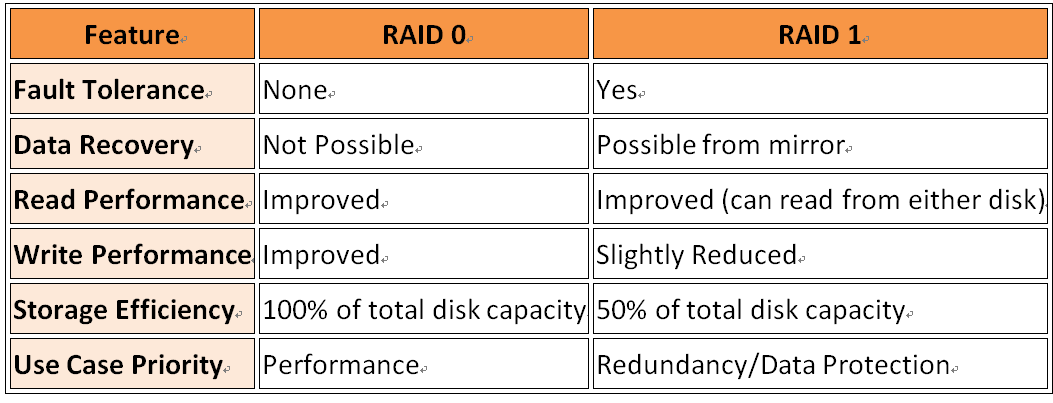
Choosing the Right RAID Level
Consider RAID 0 If:
- Performance is Critical: Applications demand the highest possible speed.
- Data is Non-Critical: Loss can be tolerated or is backed up elsewhere.
- Budget Constraints: Need maximum capacity without investing in additional disks for redundancy.
Consider RAID 1 If:
- Data Integrity is Crucial: Cannot afford to lose data due to hardware failure.
- Downtime is Not Acceptable: Systems must remain operational even if a disk fails.
- Read Performance Needs Improvement: Can benefit from simultaneous reads from multiple disks.
Alternatives and Enhancements
- RAID 10 (1+0): Combines RAID 1 and RAID 0 for both performance and redundancy. Requires a minimum of four disks.
- RAID 5/6: Uses striping with parity for fault tolerance and better storage efficiency but requires more disks and has complex rebuild processes.
Final Thoughts
Selecting between RAID 0 and RAID 1 hinges on your specific needs:
- RAID 0: Suited for speed without concern for data loss.
- RAID 1: Ideal when data protection outweighs the need for maximum storage capacity.
Always remember that RAID is not a substitute for regular backups. Regardless of the RAID level chosen, maintaining an external backup solution is essential for comprehensive data security.